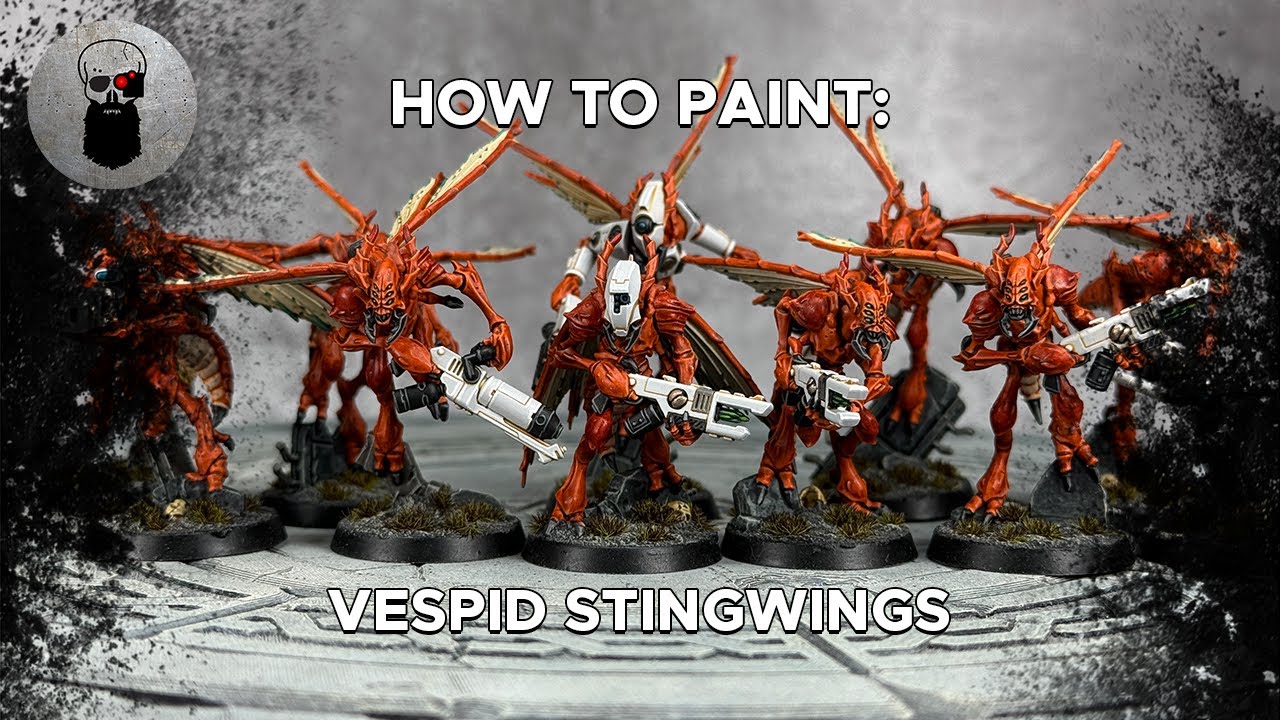
Steps
Undercoat
-
Spray undercoat onto the model.
White Scar Warhammer Colour (Citadel)
Claws, Stinger, Visor, Neutron Blaster Details
2 steps-
1. Pick out the claws, stinger, visor, and some details on the neutron blaster using Black Legion straight from the pot, applying a second layer if needed.
Black Legion Warhammer Colour (Citadel) -
2. Tidy up any mistakes made with Black Legion by painting over them with White Scar.
White Scar Warhammer Colour (Citadel)
Wings and Abdomen Underside
-
Paint the wings and the section under the abdomen with Wraithbone, thinning it down with a small amount of water and applying in a couple of thin layers. Ensure each layer is fully dry before applying another.
Wraithbone Warhammer Colour (Citadel)
Exoskeleton
4 steps-
1. Apply Gryph-Hound Orange contrast paint straight from the pot all over the exoskeleton, avoiding the wings and the underside of the abdomen. Work in sections to ensure correct drying.
Gryph-Hound Orange Warhammer Colour (Citadel) -
2. Neaten up any orange paint that may have accidentally gotten onto the Wraithbone areas (wings, abdomen underside) by painting over them with Wraithbone.
Wraithbone Warhammer Colour (Citadel) -
3. Add further definition to the exoskeleton by applying Fuegan Orange shade. Avoid the wings but apply to the underside of the abdomen for an orange hue. Take the paint straight from the pot and apply in sections.
Fuegan Orange Warhammer Colour (Citadel) -
4. Add an all-over drybrush to the exoskeleton with Fire Dragon Bright. Work the paint into paper towel first, then gently flick it back and forth across all orange areas. Build this up slowly.
Fire Dragon Bright Warhammer Colour (Citadel)
Base Rubble and Weapon Details
2 steps-
1. Paint the rubble on the base and some areas on the weapon with a couple of thin layers of Mechanicus Standard Grey.
Mechanicus Standard Grey Warhammer Colour (Citadel) -
2. Paint the classic T'au bolt on the neutron blaster and metallic parts in the rubble with Runelord Brass.
Runelord Brass Warhammer Colour (Citadel)
White Parts (Weapon, Helmet, Back Detail)
2 steps-
1. Shade all the white parts (the weapon, the detail on the back, and the helmet) using Nuln Oil mixed with Lahmian Medium in a 1:4 ratio.
Nuln Oil Warhammer Colour (Citadel) -
2. Tidy up all the white areas using White Scar. You may need three thin layers for this.
White Scar Warhammer Colour (Citadel)
Base
2 steps-
1. Shade the base using straight Nuln Oil.
Nuln Oil Warhammer Colour (Citadel) -
2. Complete the base using Astrogranite technical paint.
Astrogranite Warhammer Colour (Citadel)
Neutron Blaster Crystal
-
Complete the neutron blaster crystal using Striking Scorpion Green contrast paint.
Striking Scorpion Green Warhammer Colour (Citadel)
Helmet Lenses
-
Complete the helmet lenses using Frostheart contrast paint.
Frostheart Warhammer Colour (Citadel)
Optional Details (Advanced)
4 steps-
1. Replicate dark red patches on the shoulders by thinning Flesh Tearers Red with Lahmian Medium (1:4 ratio) and building up the effect with two or three layers.
Flesh Tearers Red Warhammer Colour (Citadel) -
2. Add another drybrush to the exoskeleton for further highlights using Ushabti Bone. Apply very lightly, focusing only on the super sharp edges, like the one on the knee.
Ushabti Bone Warhammer Colour (Citadel) -
3. Include green dot patterns towards the bottom of the wings by thinning Sons of Horus Green with water and carefully creating the patterns.
Sons of Horus Green Warhammer Colour (Citadel) -
4. Add chipping to the white areas using Gorthor Brown and a sponge.
Gorthor Brown Warhammer Colour (Citadel)
Paints used
16 paints- White Scar Warhammer Colour (Citadel) · Layer
- Black Legion Warhammer Colour (Citadel) · Contrast
- Wraithbone Warhammer Colour (Citadel) · Base
- Gryph-Hound Orange Warhammer Colour (Citadel) · Contrast
- Fuegan Orange Warhammer Colour (Citadel) · Shade
- Fire Dragon Bright Warhammer Colour (Citadel) · Layer
- Mechanicus Standard Grey Warhammer Colour (Citadel) · Base
- Runelord Brass Warhammer Colour (Citadel) · Base
- Nuln Oil Warhammer Colour (Citadel) · Shade
- Astrogranite Warhammer Colour (Citadel) · Technical
- Striking Scorpion Green Warhammer Colour (Citadel) · Contrast
- Frostheart Warhammer Colour (Citadel) · Contrast
- Flesh Tearers Red Warhammer Colour (Citadel) · Contrast
- Ushabti Bone Warhammer Colour (Citadel) · Layer
- Sons of Horus Green Warhammer Colour (Citadel) · Layer
- Gorthor Brown Warhammer Colour (Citadel) · Layer